Choosing the best Smart Lectern for global buyers requires more than comparing screens, microphones, and prices. It demands a clear view of communication, accessibility, service, and local installation conditions. A lectern may look impressive in a showroom, yet fail when sunlight washes across its display or cables cannot match regional standards.
AVIXA’s 2024 Industry Outlook and Trends Analysis forecasts the professional audiovisual market to reach approximately US$422 billion in 2024. Its growth reflects stronger demand for integrated presentation, collaboration, and learning systems. Grand View Research also reports continuing expansion in interactive display technologies, which support touch control, digital annotation, and hybrid communication. These figures offer useful direction, but they do not choose a lectern for you.
As AVIXA CEO David Labuskes, CTS, has emphasized, “AV enables people to communicate, collaborate, and learn more effectively.” That principle should guide every purchasing decision. Global buyers should examine microphone pickup, camera compatibility, operating-system support, language settings, cybersecurity, warranty coverage, and replacement-part availability. Test the device in a real room. Test it with a nervous presenter.
The perfect model probably does not exist. A premium touchscreen cannot compensate for poor acoustics. A low-cost unit may create higher service expenses later. Buyers should compare total ownership cost, technician access, software updates, and regional compliance before signing a contract. This guide explores those practical choices, including the details that product brochures often leave out.
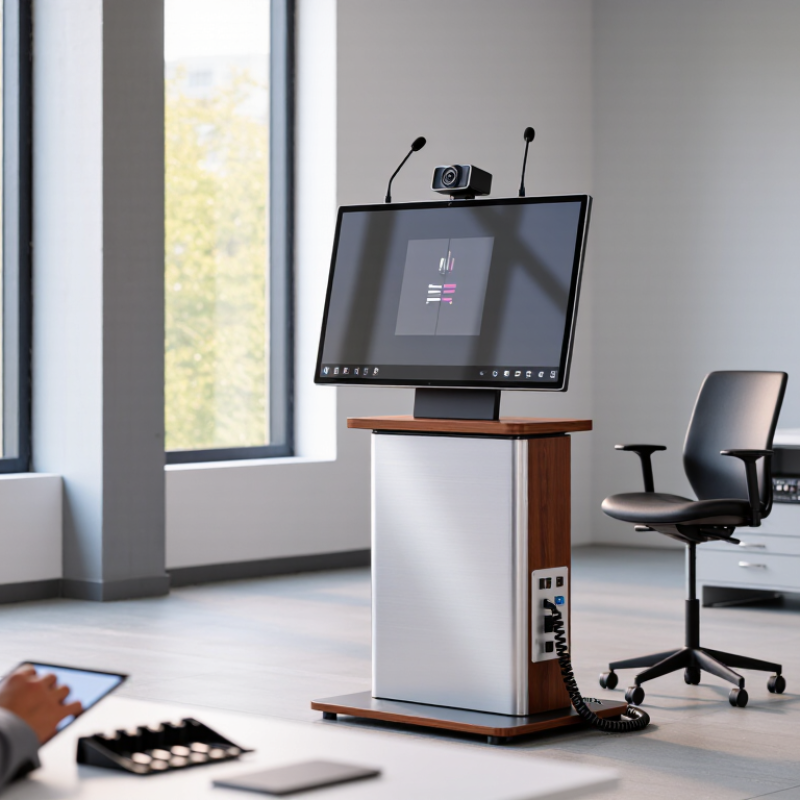
Choosing the best smart lectern starts with a clear definition of your presentation needs. A conference room may require a different setup than a university hall or mobile training space. Measure the room, viewing distance, platform height, and available floor area. Small details matter.
List the equipment you will connect. Consider a display, camera, microphone, speakers, document camera, and presentation computer. Check every port before purchasing. HDMI, USB, network, and wireless connections should match your existing systems. A lectern with cable storage can prevent loose wires around the presenter’s feet. Adjustable height also supports different speakers and accessibility requirements. Test the screen under bright lighting, not only in a showroom.
Global buyers should define practical buying requirements beyond appearance. Confirm power compatibility, local service coverage, warranty terms, spare-part access, and user training. Ask for operating instructions in suitable languages. Data protection and electrical safety requirements may differ by market, so request clear compliance documentation. Remote management can help technical teams monitor several lecterns, but it may add setup complexity. Be realistic about staff skills.
I once focused too much on screen size during a product evaluation. The larger display looked impressive, yet the microphone placement felt awkward. That mistake changed our checklist. A polished design is not always comfortable in daily use. Request a live demonstration, test common presentation files, and invite actual presenters to evaluate the controls. Their feedback may challenge your original assumptions. Small frustrations become expensive when repeated every day.
A smart lectern should support the speaker, not compete for attention. Compare its display size, brightness, viewing angle, and touch accuracy under real room lighting. A clear 15-inch screen may work better than a larger, reflective panel. Check whether the interface supports multiple languages and readable text scaling. Small details matter. Review microphone pickup, speaker clarity, camera placement, and ventilation during a full presentation. A practical test is more reliable than a specification sheet alone.
Controls should feel natural when the presenter is under pressure. Look for physical buttons or a control panel for volume, screen sharing, lighting, and display selection. Touch controls are flexible, but they can slow users wearing gloves or working with wet hands. Accessibility also deserves attention, including adjustable height and high-contrast controls. No setup is perfect. A short user trial may reveal confusing icons or delayed responses that engineers missed.
Connectivity determines how well the lectern travels across regions and meeting spaces. Check HDMI, USB-C, Ethernet, wireless presentation, and audio inputs. Confirm compatibility with common operating systems and international power requirements. Wired networking can provide steadier performance in crowded venues, while wireless access improves flexibility. Ask for security documentation, firmware support terms, and clear repair procedures. Test cable access from the presenter’s position; hidden ports often become awkward during live changes. Regional service coverage can matter as much as processing speed.
Compatibility should match your room, devices, and network conditions.
Check HDMI, USB-C, wireless presentation, audio, and camera support before buying.
Power requirements also matter across regions.
Request clear voltage and frequency specifications.
A USB-C port may charge a laptop but fail to transmit video.
I have seen this problem disrupt an otherwise well-planned presentation. That small detail deserves careful testing.
Ask suppliers for compatibility lists and documented test results.
Independent reviews can reveal weaknesses that product sheets sometimes hide.
Security deserves equal attention.
Look for encrypted communication, secure user accounts, role-based access, and controlled firmware updates.
Sensitive presentation files should not remain exposed on shared storage.
Ask how administrators remove accounts and reset devices.
Choose readable displays, adjustable height, tactile controls, caption support, and clear audio output.
Controls should remain usable under bright stage lights.
Simple menus reduce training time.
During a live event, simplicity matters.
A good lectern should start quickly and recover gracefully after a failed connection.
I once ignored setup time and created unnecessary pressure for presenters.
That mistake changed my evaluation process.
Request a hands-on trial with different laptops, microphones, and network settings.
Real reliability appears during ordinary failures.
When evaluating a smart lectern for international use, supplier quality matters as much as screen size.
Request factory ownership details, production photos, test records, and recent export references. A video call can reveal whether staff understand microphones, displays, cable routing, and classroom acoustics. Ask for a sample unit before placing a volume order.
Small details matter.
Check frame stability, fan noise, writing height, wheel locks, and heat around the power module. A polished brochure is not proof.
Customization should solve a documented teaching problem, not decorate a standard cabinet.
Discuss screen size, camera position, control panels, logo placement, colors, power sockets, language settings, and software compatibility. Ask for drawings, material specifications, and a change-control process before approval.
In field evaluations, late port changes have affected internal brackets and delayed delivery. That mistake is expensive.
Require a functional prototype and written acceptance criteria. Also confirm documents relevant to the destination market’s electrical requirements.
Compare total cost, not only unit price.
Include tooling, packaging, freight, duties, installation, training, spare parts, and warranty labor. A low quote may hide fragile hinges or limited after-sales coverage.
Request clear response-time promises, remote diagnostics, replacement-part availability, and escalation contacts across time zones. Support should continue after installation.
Test one support ticket before signing.
My own checklist once missed firmware update ownership, causing avoidable confusion. Leave room for revision; specifications can look complete until teachers use the lectern daily.
How to Choose the Best Smart Lectern for Global Buyers?
A smart lectern should survive real teaching conditions, not just look impressive in a product catalog. Test every shortlisted model with actual presentation files, video calls, and classroom questions.
Use a two-hour trial. Connect a laptop through USB-C and HDMI, then switch between slides, videos, and online speakers. Check screen brightness near windows. Listen for microphone noise from two meters away. Measure touch response during fast annotation. Notice heat around the processor and cable ports. Small details matter.
Global buyers should verify power input, plug compatibility, language settings, accessibility features, and local service support. A reliable model should accept common file formats and connect with standard classroom equipment. Confirm warranty coverage in each target market. Written support terms are safer than sales promises.
Do not trust specifications alone. A high-resolution camera may perform poorly under ceiling lights. A powerful processor may still lag with large presentations. Our test room may also hide problems found in crowded venues. Repeat trials with different users, network conditions, and room layouts. Keep a scoring sheet for stability, sound, control, maintenance, and total ownership cost. The best global solution may not be the most advanced one. It should be predictable, repairable, and comfortable for daily use.
Comparative evaluation of representative smart lectern configurations for international education, conference, government, and corporate environments.
| Shortlisted Model | Display | Operating Platform | Camera and Audio | Connectivity | Adjustability | Power and Safety | Approx. Weight | International Suitability | Overall Score | Selection Result |
|---|---|---|---|---|---|---|---|---|---|---|
| Model A — Integrated Professional | 21.5-inch IPS touch display 1920 × 1080 resolution | Windows-compatible computer module 8 GB RAM / 256 GB SSD configuration | 1080p camera Beamforming microphone array Integrated speakers | HDMI, USB-A, USB-C, LAN, Wi-Fi 6, Bluetooth | Electric height adjustment Approx. 680–1,080 mm working range | AC 100–240 V, 50/60 Hz Overload and over-temperature protection | Approx. 48 kg | Strong compatibility with hybrid meetings, multilingual presentations, and varied regional power systems | 91 / 100 | Recommended Global Solution |
| Model B — Large-Display Collaboration | 27-inch IPS touch display 2560 × 1440 resolution | Embedded Android platform 8 GB RAM / 128 GB storage configuration | 4K camera Digital microphone array Front-facing speakers | HDMI input, USB, LAN, Wi-Fi 6, Bluetooth | Fixed-height structure Manual monitor tilt | AC 100–240 V, 50/60 Hz Integrated surge protection | Approx. 42 kg | Excellent visual clarity and simple deployment; software compatibility should be checked for specialized applications | 88 / 100 | Best for large visual content |
| Model C — Portable Presentation | 15.6-inch capacitive touch display 1920 × 1080 resolution | Android-based control system 4 GB RAM / 64 GB storage configuration | 1080p camera Dual microphones Integrated speakers | HDMI, USB-A, LAN, Wi-Fi 5, Bluetooth | Manual height adjustment Approx. 850–1,050 mm working range | AC 100–240 V, 50/60 Hz Replaceable fuse protection | Approx. 29 kg | Easy to transport and install; lower computing capacity may limit advanced collaboration software | 82 / 100 | Best for mobile applications |
| Model D — Accessibility-Focused | 21.5-inch IPS touch display 1920 × 1080 resolution | Windows-compatible computer module 16 GB RAM / 512 GB SSD configuration | 1080p camera Noise-reduction microphone array Integrated speakers | HDMI, DisplayPort, USB, LAN, Wi-Fi 6, Bluetooth | Electric height adjustment Approx. 650–1,150 mm working range | AC 100–240 V, 50/60 Hz Emergency stop and anti-collision protection | Approx. 55 kg | Strong accessibility and computing performance; higher weight and cost require more demanding installation planning | 90 / 100 | Best for inclusive public facilities |
| Model E — Cost-Control Configuration | 17.3-inch LED display 1920 × 1080 resolution | Android-based control system 4 GB RAM / 64 GB storage configuration | 1080p camera Single microphone Integrated speakers | HDMI, USB-A, LAN, Wi-Fi 5 | Fixed-height structure Manual display tilt | AC 100–240 V, 50/60 Hz Basic short-circuit protection | Approx. 34 kg | Suitable for standard presentations; fewer audio, accessibility, and management features | 76 / 100 | Best for budget-sensitive projects |
WhatsAppOffer Electronics Manufacturing All-in-One
PCBONLINE® is a registered trademark or service mark of pcb online limited or its affiliates.
Copyright © 2001-2024 Pcb Online Limited. All rights reserved